
How AI Insights Work
JetStack AI uses AI to transform raw audit data into actionable, human-readable insights. Instead of just showing you a score and a list of data points, the AI layer interprets the findings, explains what they mean, and tells you what to do about them.
This page covers the technology, process, and output format of AI-generated insights.
The AI Model
Section titled “The AI Model”JetStack AI uses Claude Haiku from Anthropic to generate insights. The model is configured with:
- Temperature: 0.3 — Low temperature produces consistent, focused output. The same audit data will generate similar insights each time, avoiding the randomness that higher temperatures introduce.
- Structured JSON output — Insights are generated using tool_use (function calling), which ensures every response follows a strict schema. There are no free-form text responses that could drift off-format.
This combination means insights are reliable, consistently formatted, and directly usable in reports without manual editing.
How Generation Works
Section titled “How Generation Works”AI insight generation follows a structured pipeline:
1. Data Collection
Section titled “1. Data Collection”After the audit scoring engine completes, JetStack AI assembles the scored data for each block — the raw values, the calculated scores, the thresholds, and the relative performance of each data point within the block.
2. Block-Level Generation
Section titled “2. Block-Level Generation”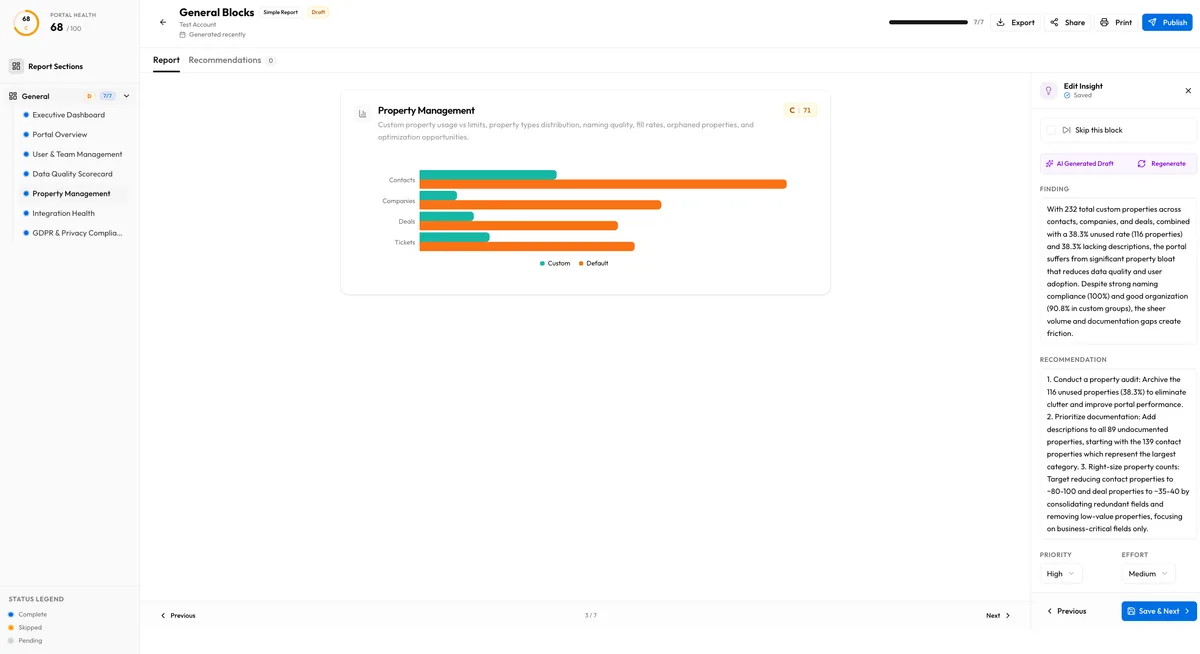
For each block in the audit, the AI receives the block’s data points, scores, and context. It generates a structured insight containing:
- Finding — A 1-2 sentence summary of what the data shows
- Recommendation — 2-3 actionable steps to improve
- Priority — High, medium, or low
- Effort — High, medium, or low (estimated implementation effort)
See Block Insights for full details on the block-level output.
3. Executive Summary Generation
Section titled “3. Executive Summary Generation”After all block insights are generated, the AI produces an executive summary that synthesizes the full audit into:
- Top 3 strengths — What the portal does well
- Top 3 critical issues — What needs immediate attention
- Top 3 quick wins — High-impact improvements that require minimal effort
See Executive Summary for the full breakdown.
Status Tracking
Section titled “Status Tracking”Every AI insight goes through a status lifecycle:
| Status | Meaning |
|---|---|
| none | Insight has not been requested yet |
| generating | AI is currently processing the data and producing output |
| ready | Insight has been generated and is available for review |
| failed | Generation encountered an error (network, model timeout, or data issue) |
You can monitor the status of each insight in the audit detail view. Failed insights can be retried individually — you do not need to regenerate the entire audit.
When Insights Are Generated
Section titled “When Insights Are Generated”AI insights are generated automatically as part of the audit pipeline. After the data collection and scoring phases complete, the insight generation phase begins. The full process typically takes 1-3 minutes depending on the number of blocks in the audit.
You can also regenerate insights for individual blocks at any time. This is useful if:
- A previous generation failed
- You want a fresh perspective after making portal changes
- You want to regenerate after the AI model has been updated
Publish and Unpublish
Section titled “Publish and Unpublish”Generated insights are not automatically visible in shared reports. You control which insights appear in client-facing reports through the publish/unpublish mechanism. See Publishing for details.
Data Privacy
Section titled “Data Privacy”The AI model receives only the aggregated audit data — scores, data point values, and block metadata. It does not receive raw HubSpot data such as contact records, email content, or deal amounts. The data sent to the AI is limited to the statistical and configuration measurements that the audit engine collects.
Limitations
Section titled “Limitations”- Insights are based solely on the data points measured by the audit. If a best practice is not covered by a data point, the AI cannot comment on it.
- The AI does not have access to your specific business context, industry benchmarks, or historical data beyond the current audit.
- Recommendations are general best practices. They may need to be adapted to your client’s specific business requirements and workflows.