
Plans & Limits
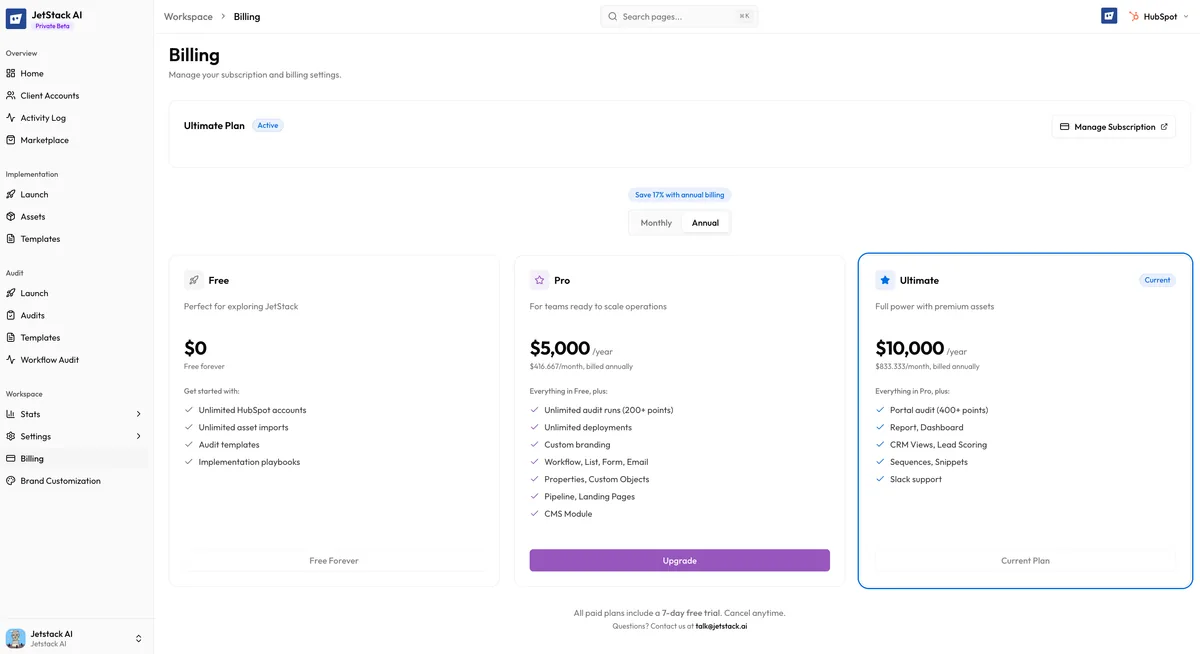
JetStack AI offers three plans designed to scale with your agency or RevOps team. Every plan includes the core implementation and audit capabilities — the differences come down to volume, advanced features, and support level.
Plan Overview
Section titled “Plan Overview”| Feature | Pro | Ultimate | Custom |
|---|---|---|---|
| Monthly price | $525/mo | $1,250/mo | Contact sales |
| Client accounts | 3 | 10 | Unlimited |
| Asset imports per month | 100 | Unlimited | Unlimited |
| Deployments per month | 50 | Unlimited | Unlimited |
| Audits per month | 5 | Unlimited | Unlimited |
| Audit data points | 450+ | 450+ | 450+ |
| Asset types | 15+ core types | 20+ all types | 20+ all types |
| Chrome Extension | Included | Included | Included |
| Marketplace access | Full | Full | Full |
| Dashboard assets | Not included | Included | Included |
| Report assets | Not included | Included | Included |
| Snippet assets | Not included | Included | Included |
| Custom domains | Not included | Included | Included |
| White-label reports | Basic | Full branding | Full branding |
| Support | Priority email + chat | Dedicated account manager | |
| Security | Standard | Advanced (SSO, audit logs) | Enterprise (custom policies) |
What Is Included in Every Plan
Section titled “What Is Included in Every Plan”Regardless of which tier you choose, all plans include:
- Core implementation workflow — Import assets from a source portal, review them in your workspace, and deploy to a destination portal
- Dependency resolution — JetStack AI automatically resolves references between assets (e.g., a workflow that references a list, a form embedded in a page) during import and deployment
- AI-powered audit insights — Every audit finding includes an AI-generated explanation and recommendation, not just a pass/fail flag
- Chrome Extension — The sidebar panel for in-context access inside HubSpot
- Marketplace — Full access to pre-built templates and modules
- Activity logging — Real-time progress tracking for all imports, deployments, and audits
Pro Plan — $525/month
Section titled “Pro Plan — $525/month”The Pro plan is designed for smaller agencies or teams managing a handful of client portals. It covers the core asset types that make up the majority of implementation work.
Best for: Solo consultants, small agencies, or teams just getting started with JetStack AI.
Core asset types included: Workflows, lists, forms, emails, pipelines, landing pages, website pages, templates, modules, blog posts, HubDB tables, properties, association labels, custom objects, and more.
What is not included:
- Dashboard, report, and snippet asset types — these are extension-tier assets available on Ultimate
- Custom domains for white-label client-facing outputs
- Advanced security features like SSO and organization audit logs
Ultimate Plan — $1,250/month
Section titled “Ultimate Plan — $1,250/month”The Ultimate plan unlocks everything in JetStack AI with no volume limits and full access to all asset types including extension assets.
Best for: Mid-size to large agencies, RevOps teams managing many client accounts, and teams that need the full asset coverage.
Everything in Pro, plus:
- Unlimited client accounts (up to 10), imports, deployments, and audits
- Dashboard assets — Import and deploy HubSpot dashboards
- Report assets — Import and deploy custom reports
- Snippet assets — Import and deploy sales snippets
- Custom domains — Use your own domain for client-facing audit reports and outputs
- Full white-label branding — Complete control over logos, colors, and branding in reports
- Priority support — Email and chat support with faster response times
- Advanced security — SSO integration and detailed organization audit logs
Custom Plan
Section titled “Custom Plan”For organizations with needs that go beyond Ultimate — whether that is more than 10 client accounts, enterprise security requirements, custom integrations, or dedicated onboarding — the Custom plan is built around your specific requirements.
Custom plans can include:
- Unlimited client accounts with no cap
- Dedicated account manager and onboarding support
- Custom security policies and compliance documentation
- SLA guarantees on support response times
- Custom integrations or API access
- Volume-based pricing for very large teams
To discuss a Custom plan, contact team@jetstack.ai.
What Happens When You Hit a Limit
Section titled “What Happens When You Hit a Limit”JetStack AI does not silently block your work. Here is how limits are handled on the Pro plan:
- Client accounts — When you reach your 3-portal limit, the “Add Portal” button is disabled and a message prompts you to upgrade. Existing connections remain fully functional.
- Asset imports — When you approach your monthly import limit, JetStack AI shows a warning in the import flow with your remaining count. Once the limit is reached, new imports are paused until your next billing cycle or until you upgrade.
- Deployments — Same behavior as imports. A counter shows remaining deployments, and the deploy action is paused when the limit is reached.
- Audits — When you have used all 5 monthly audits, the Launch Audit button shows a limit-reached message. Previously completed audits remain fully accessible for review.
All limits reset at the start of each billing cycle. You are never charged overage fees — the actions are simply paused until the reset or until you upgrade your plan.
How to Upgrade
Section titled “How to Upgrade”You can upgrade your plan at any time from Workspace > Billing in the JetStack AI dashboard.
- Navigate to Workspace > Billing in the sidebar.
- Click Change Plan.
- Select your new plan tier.
- Confirm payment details. If you are upgrading mid-cycle, you are charged a prorated amount for the remainder of the current billing period.
- New limits and features take effect immediately — no restart or reconnection required.
Downgrades work the same way but take effect at the start of your next billing cycle. If you downgrade and have more connected portals than your new plan allows, you will be asked to choose which portals to keep active.
Frequently Asked Questions
Section titled “Frequently Asked Questions”Can I try JetStack AI before committing to a plan? Contact the sales team at team@jetstack.ai to discuss trial options.
Do annual billing discounts exist? Yes. Contact sales for annual pricing.
What counts as an “asset import”? Each individual asset pulled from a source portal counts as one import. For example, importing 10 workflows and 5 lists counts as 15 asset imports.
Are previously imported assets accessible after a downgrade? Yes. Assets already in your workspace remain accessible. You simply cannot import new assets beyond your new plan’s limits.
Next Steps
Section titled “Next Steps”- Quickstart Guide — Get up and running in under 10 minutes
- Connecting Your First Portal — Set up your first HubSpot connection
- Understanding the Dashboard — Navigate the full JetStack AI workspace