
Implementation Modules
Implementation modules are the primary content type in the JetStack AI Marketplace. Each module is a curated bundle of related HubSpot assets — workflows, lists, forms, pipelines, email templates, and more — packaged for a specific operational use case and ready to deploy into any connected portal.
What a Module Includes
Section titled “What a Module Includes”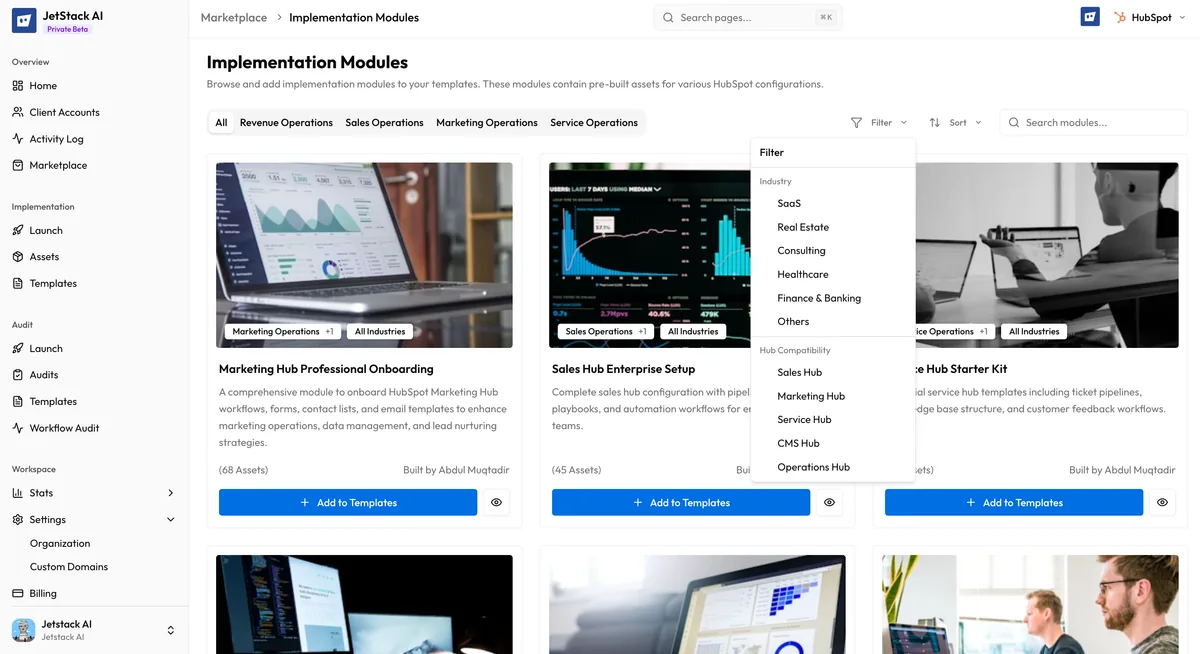
Every implementation module contains the following:
- Description — A detailed explanation of what the module does, the problem it solves, and the intended use case
- Asset list — The complete inventory of HubSpot assets included in the module, grouped by type (workflows, lists, forms, pipelines, emails, properties, etc.)
- Best practices — Guidance on how to configure and customize the module after deployment, including recommended property mappings and common adjustments
- Inclusions list — A breakdown of exactly what gets created in the destination portal, so you know the full scope before you install
- Dependencies — Any cross-asset dependencies the module requires, which JetStack AI resolves automatically during deployment
Module Categories
Section titled “Module Categories”Modules are organized into four operational categories:
| Category | Examples |
|---|---|
| Sales Operations | Lead routing workflows, deal pipeline setups, sales sequence bundles, forecasting dashboards, lead scoring models |
| Marketing Operations | Campaign automation stacks, nurture sequence packages, form-to-workflow chains, email template libraries, lead qualification flows |
| Service Operations | Ticketing pipeline configurations, SLA enforcement workflows, customer feedback loops, knowledge base structures, escalation chains |
| Revenue Operations | Lifecycle stage management, cross-hub reporting bundles, attribution model setups, revenue forecasting workflows, data hygiene automation |
Industry-Specific Modules
Section titled “Industry-Specific Modules”Beyond operational categories, many modules target specific industries:
- SaaS — Trial-to-paid conversion funnels, churn prevention workflows, product-led growth automation
- Healthcare — Patient intake forms, appointment scheduling workflows, HIPAA-compliant communication chains
- FinTech — Application processing pipelines, compliance review workflows, onboarding sequences for financial products
- Manufacturing — Distributor management workflows, quote-to-order pipelines, supply chain notification systems
- Professional Services — Client onboarding packages, project handoff workflows, retainer renewal automation
- E-Commerce — Abandoned cart recovery, post-purchase nurture sequences, product review request flows
The Marketplace currently features 30+ modules across these categories and industries, with new modules added regularly through community and partner contributions.
How to Install a Module
Section titled “How to Install a Module”The installation flow takes you from the Marketplace directly into the implementation wizard:
Step 1: Browse and Select
Section titled “Step 1: Browse and Select”Navigate to the Marketplace and find the module you want. You can browse featured modules on the home page, search by name or keyword, or filter by category and industry. Click the module card to view its full details.
Step 2: Click Install
Section titled “Step 2: Click Install”On the module detail page, click the Install button. This redirects you to the implementation wizard.
Step 3: Implementation Wizard
Section titled “Step 3: Implementation Wizard”The implementation wizard opens with the module’s assets pre-selected. From here you follow the standard implementation flow:
- Review assets — Confirm the list of assets that will be deployed. You can deselect individual assets if you do not need the full module.
- Select destination portal — Choose which connected HubSpot portal will receive the assets.
- Map properties — JetStack AI presents the property mapping interface where you align source properties to destination properties. Custom properties that do not exist in the destination can be created automatically.
- Map owners and pipelines — Assign owner mappings and pipeline mappings for the destination portal.
- Deploy — Launch the deployment. JetStack AI resolves the dependency graph and creates assets in the correct order, remapping all internal IDs.
For full details on each step, see How Deployment Works.
Asset Types in Modules
Section titled “Asset Types in Modules”Modules can include any combination of the following asset types:
| Category | Asset Types |
|---|---|
| CRM | Workflows, Lists, Forms, Emails, Pipelines, Association Labels, Property Sets |
| CMS | Pages, Templates, Blog Posts, HubDB Tables, Email Templates, Template Modules |
| Ultimate | Dashboards, Reports, Snippets, Goal Templates, Lead Scores, Playbooks |
The asset types available to you depend on your JetStack AI plan. CRM and CMS assets require the Pro plan; Ultimate assets require the Ultimate plan.
Best Practices for Using Modules
Section titled “Best Practices for Using Modules”- Review the asset list before installing. Understand what will be created in your destination portal so you can plan property and pipeline mappings in advance.
- Start with a sandbox portal. If you are deploying a module for the first time, test it in a sandbox or development portal before deploying to production.
- Customize after deployment. Modules are designed as starting points. After deployment, review each asset in HubSpot and adjust copy, timing, and conditions to match your specific requirements.
- Check for conflicts. If your destination portal already has workflows or pipelines with similar names, review them before deploying to avoid duplication.
Next Steps
Section titled “Next Steps”- Browsing the Marketplace — Search and filter the module catalog
- Audit Templates — Explore pre-built audit configurations
- Contributing to the Marketplace — Submit your own modules