
Audit Templates
Audit templates are pre-configured audit setups available in the JetStack AI Marketplace. Each template defines which audit blocks to scan, targeting a specific hub or focus area. Instead of manually selecting blocks every time you run an audit, you pick a template and launch immediately.
What an Audit Template Includes
Section titled “What an Audit Template Includes”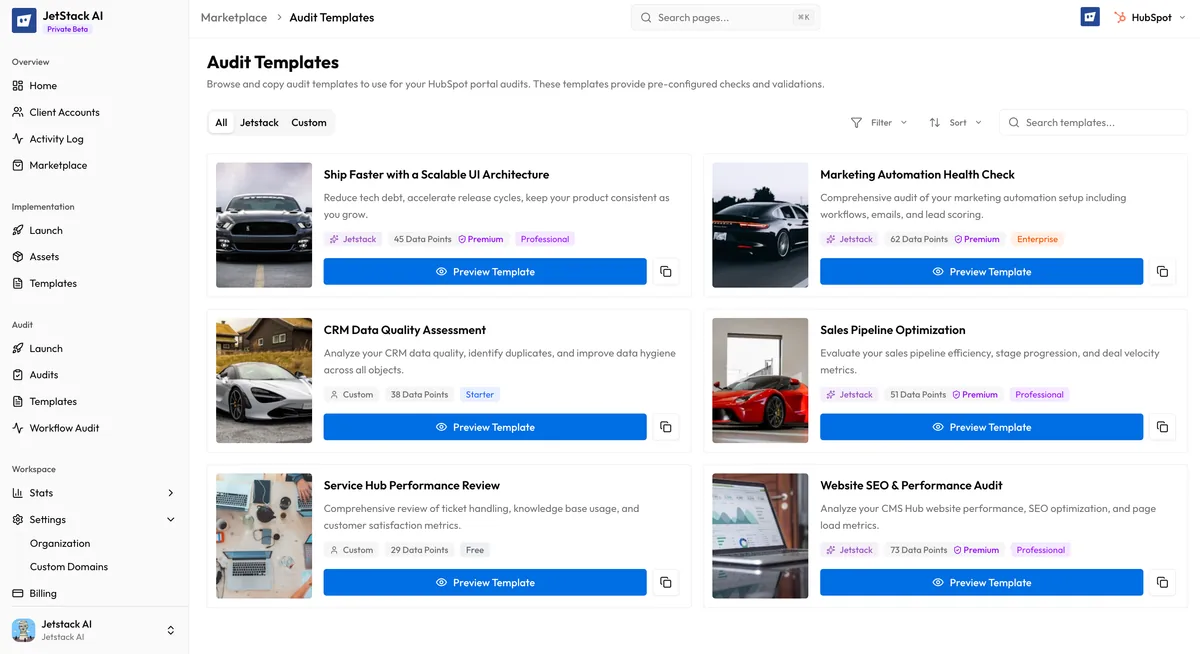
Every audit template contains the following:
- Name — A descriptive title indicating the template’s focus (e.g., “Full Portal Audit,” “Sales Hub Deep Dive”)
- Description — An explanation of what the template covers, what it is designed to evaluate, and who should use it
- Blocks included — The specific audit blocks that will run when you use this template, with each block targeting a distinct area of your HubSpot portal
- Hub focus area — The primary HubSpot hub (or hubs) the template targets: Sales, Marketing, Service, CMS, or All
Available Template Categories
Section titled “Available Template Categories”Templates are organized by their hub focus area:
Full Portal Audit
Section titled “Full Portal Audit”The most comprehensive option. Full portal templates scan across all hubs and asset types, including CRM configuration, workflows, lists, forms, emails, pipelines, pages, templates, and reporting. Use this template when you need a complete health check of an entire portal.
Typical blocks included: CRM properties, lifecycle stages, deal pipelines, workflows, lists, forms, marketing emails, landing pages, blog configuration, reporting dashboards, user permissions, and integration health.
Sales Hub Focus
Section titled “Sales Hub Focus”Sales-focused templates concentrate on the assets and configurations that drive revenue operations. They evaluate deal pipeline structure, sales workflow efficiency, sequence performance, and lead routing logic.
Typical blocks included: Deal pipelines and stages, sales workflows, sequences, lead scoring, contact assignment rules, forecasting configuration, and quote templates.
Marketing Hub Focus
Section titled “Marketing Hub Focus”Marketing templates target campaign infrastructure, lead generation assets, and nurture automation. They assess whether your marketing engine is configured for effective lead capture and conversion.
Typical blocks included: Marketing emails, forms, landing pages, CTAs, campaign structure, nurture workflows, lead scoring, blog settings, social configuration, and ad tracking.
Service Hub Focus
Section titled “Service Hub Focus”Service templates evaluate your customer support and success infrastructure. They scan ticketing pipelines, SLA configurations, feedback mechanisms, and service automation.
Typical blocks included: Ticket pipelines and stages, service workflows, feedback surveys, knowledge base structure, SLA rules, and customer satisfaction metrics.
CMS Hub Focus
Section titled “CMS Hub Focus”CMS templates focus on your website and content infrastructure. They review page structure, template usage, blog configuration, and HubDB table health.
Typical blocks included: Website pages, landing pages, blog posts, templates, template modules, HubDB tables, file manager organization, and domain configuration.
How to Use an Audit Template
Section titled “How to Use an Audit Template”Using a template follows a streamlined three-step flow:
Step 1: Browse and Select
Section titled “Step 1: Browse and Select”Navigate to the Marketplace and open the Audit Templates section. Browse the featured templates on the home page or click Browse All Templates to view the full catalog. Filter by hub focus area to narrow your search.
Step 2: Click Use Template
Section titled “Step 2: Click Use Template”On the template card or detail page, click the Use Template button. This redirects you to the audit launch wizard.
Step 3: Audit Launch Wizard
Section titled “Step 3: Audit Launch Wizard”The audit wizard opens with the template’s blocks pre-selected. From here you:
- Choose your portal — Select which connected HubSpot portal to audit.
- Review blocks — Confirm the blocks that will be scanned. You can add or remove individual blocks if the template does not match your needs exactly.
- Configure branding — Optionally set branding for the audit report output.
- Launch — Start the audit. JetStack AI connects to the selected portal and scans each block, generating findings and scores.
For the full audit workflow, see Running an Audit.
Template vs. Manual Block Selection
Section titled “Template vs. Manual Block Selection”| Aspect | Using a Template | Manual Selection |
|---|---|---|
| Setup time | Seconds — blocks are pre-selected | Minutes — you select each block individually |
| Consistency | Same blocks every time for repeatable audits | Varies by user and session |
| Customization | Can add or remove blocks after loading | Full control from the start |
| Best for | Standardized audits, client-facing reports, recurring reviews | One-off investigations, targeted deep-dives |
Templates do not lock you in. After loading a template into the wizard, you have full control to adjust the block selection before launching.
When to Use Each Template
Section titled “When to Use Each Template”| Scenario | Recommended Template |
|---|---|
| New client onboarding audit | Full Portal Audit |
| Quarterly portal health check | Full Portal Audit |
| Sales pipeline optimization project | Sales Hub Focus |
| Campaign performance review | Marketing Hub Focus |
| Support workflow evaluation | Service Hub Focus |
| Website migration assessment | CMS Hub Focus |
| Pre-implementation baseline | Full Portal Audit |
Next Steps
Section titled “Next Steps”- Browsing the Marketplace — Search and filter the template catalog
- Implementation Modules — Explore pre-built asset bundles for deployment
- Contributing to the Marketplace — Submit your own audit templates