 Introducing Jetty
 The AI that implements for you
Jetty imports, customizes, and deploys platform assets across 7 platforms. Use it from the dashboard, your terminal, or through Claude and ChatGPT.




Three ways to use Jetty
Whether you prefer a visual dashboard, a programmable CLI, or natural language through AI connectors, Jetty meets you where you work.
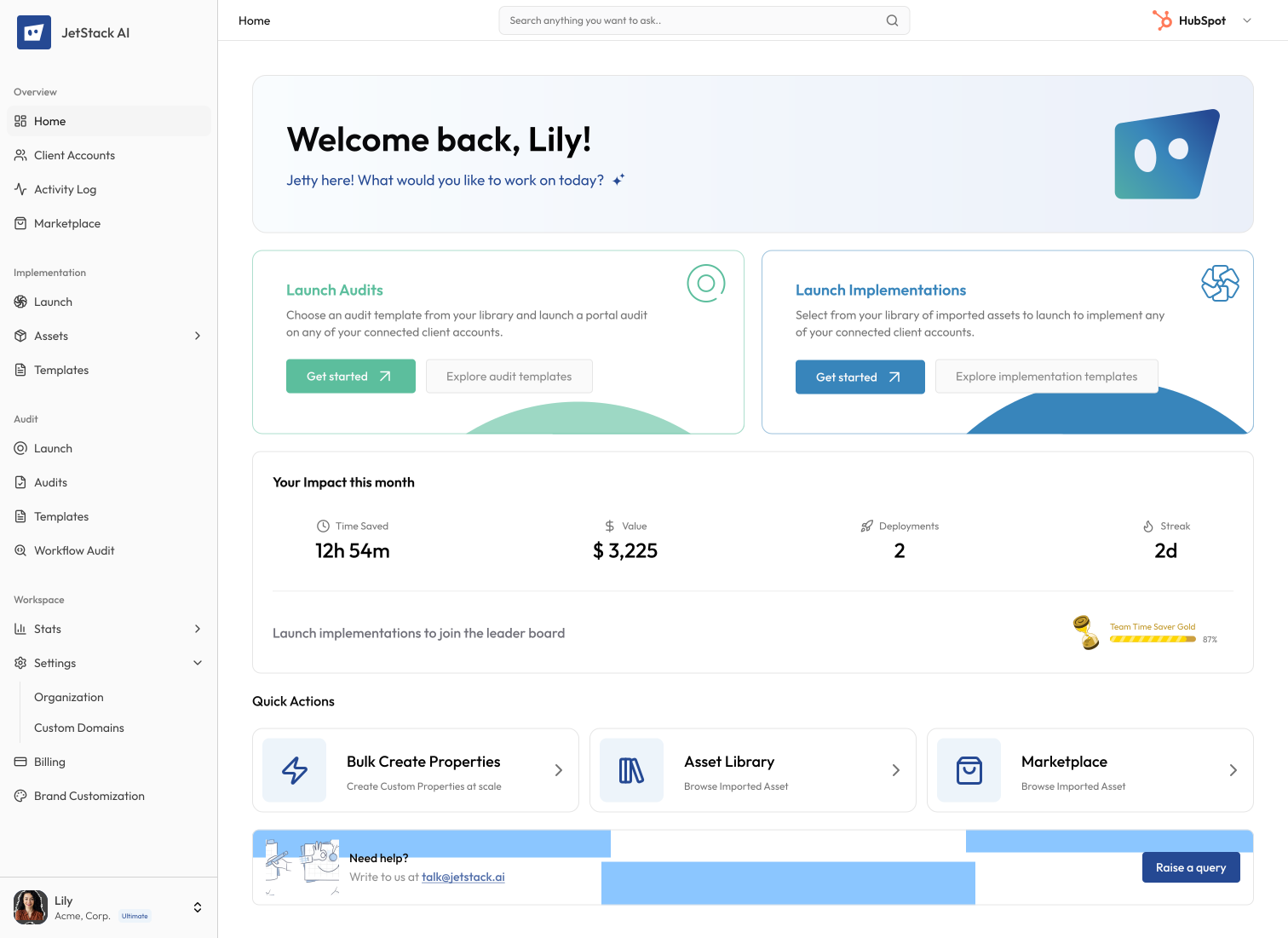
The JetStack AI Dashboard
Jetty's intelligence built into a visual interface. Run audits, generate implementations, customize, and deploy from one dashboard.
Built for the terminal
35+ commands across 6 groups. Import, manage, customize, and deploy. Fully scriptable and automatable.
npm install -g @jetstackai/cli Talk to your platforms in plain English
JetStack AI connectors plug into Claude and ChatGPT. Describe what you need and the AI executes it through Jetty.
Jetty
Online
✓ Rename 8 properties to Acme's terminology
✓ Update 3 email templates
✓ Adjust 2 workflow triggers
✓ 12 dependencies preserved
Run dry-run preview?
✓ Deployed to hub_891
Done! Rollback available anytime.
How Jetty works
Four steps from connected instance to deployed assets.
Connect
Link your platform instance to JetStack AI via OAuth or access token. Jetty maps every asset, dependency, and relationship across your portal in seconds.
Import & Organize
Pull assets with full dependency resolution into your template database. Jetty auto-groups them into modules and generates structured indexes documenting contents, types, and constraints.
Customize with Context
Feed Jetty your playbook, client requirements, and module index. The AI modifies only mutable fields, follows your naming conventions, and preserves every dependency reference.
Deploy & Merge
Push to fresh or existing instances. For populated portals, Jetty generates a diff report, resolves conflicts, and deploys in merge mode. Dry-run validation and rollback on every action.
Deploy to any instance.
Even populated ones.
When a target instance already has assets, Jetty imports the current state, generates a structured diff, and deploys in merge mode. No data loss, no overwrites.
Import existing state
Jetty pulls all assets from the target instance into a temporary module with a full dependency map.
Generate diff report
Structured comparison showing what is already present, what is missing, what conflicts, and what is redundant.
Resolve conflicts
AI resolves property type mismatches, duplicate names, and dependency collisions using context from the playbook.
Merge deploy
Add what is missing, update what is mapped, skip what is matched. Full dry-run validation before anything lands.
Built for solutions partners
Whether you are onboarding a new client or standardizing across dozens, Jetty handles the complexity so you can focus on strategy.
New Client Onboarding
Fetch a template module, customize it with the client transcript and playbook, and deploy to a blank instance. What used to take days now takes minutes.
Existing Portal Migration
Import the existing portal state, generate a diff against your template, resolve conflicts, and deploy in merge mode, preserving everything that already works.
Cross-Client Standardization
One template module, deployed and customized per client. Every implementation follows the same playbook while adapting to each client's specific needs.
Template Library Building
Import assets from your best implementations, refine them in a Studio portal, and re-import as perfected templates. Every project makes the next one faster.
Your intelligence
stays yours
JetStack AI never accesses CRM records or client data. Only schema and assets. All your work, exclusively yours and fully protected.
Frequently asked questions
What is Jetty?
Jetty is the AI engine behind JetStack AI. It powers everything from audits and implementations to template customization and deployment. You can access it through the JetStack AI dashboard, the Jetty CLI (npm install -g @jetstackai/cli), or AI connectors for Claude and ChatGPT.
What are the three ways to use Jetty?
You can use Jetty through the JetStack AI web dashboard for a visual experience, the Jetty CLI for terminal-based programmatic workflows, or through AI connectors that let Claude and ChatGPT orchestrate Jetty operations in natural language.
Which platforms does Jetty support?
Jetty supports all 7 platforms available on JetStack AI including HubSpot, Salesforce, Dynamics 365, Asana, Jira, Monday.com, and ClickUp. The same import, customize, and deploy workflow works across all of them.
How do AI connectors work?
JetStack AI connectors plug directly into Claude and ChatGPT. Once connected, you can describe what you need in plain English. The AI reads your module indexes, follows your playbook rules, and executes multi-step Jetty workflows on your behalf with dry-run validation on every action.
What is a module index?
When you import assets into Jetty, they are grouped into modules. Each module gets an auto-generated index that documents every asset, its type, dependencies, and which fields are safe to customize. AI tools read this index to make intelligent, safe modifications.
How does deployment to existing portals work?
Jetty imports the current state of the target portal, generates a structured diff against your template, and deploys in merge mode. It adds what is missing, updates what is mapped, and skips what is already matched. Dry-run validation runs before anything lands.
Is my data safe?
JetStack AI only accesses portal schema and assets, never CRM records or client data. All connections use OAuth 2.0 with revocable tokens and TLS 1.3 encryption. Your data is never used to train models.
How do I get started?
You can start from the JetStack AI dashboard at app.jetstack.ai, install the CLI with npm install -g @jetstackai/cli, or connect the AI connector through Claude or ChatGPT. All three methods use the same access token from your dashboard under Settings > Access Tokens.
Less busywork. More delivery, everywhere.
See how JetStack AI turns weeks of manual ops into minutes.
Book a demo now. No commitment, no sales pitch.