HubSpot Audit Template Builder
Native HubSpot API integration. Pre-built portal templates. 700+ data point coverage.
The challenge
HubSpot's hundreds of default properties spread across 4 objects — contacts, companies, deals, and tickets — make audit template scope unmanageable. Hub tier variations mean entire sections are irrelevant when clients lack certain Hubs, workflow and sequence sections go blank for portals using only basic features, and every Hub combination demands a different template structure that static documents cannot support.
Properties across four objects overwhelm templates
HubSpot portals accumulate hundreds of default and custom properties across contacts, companies, deals, and tickets. Templates that try to cover all property groups become 30-page documents where critical findings like broken lifecycle stage mappings disappear into noise.
Hub tier variations make sections irrelevant
Marketing Hub Enterprise portals need sections for sequences, workflows, and automated emails — but Sales Hub Starter portals have none of these features. Templates with fixed Hub-specific sections produce blank pages for clients whose Hub combination does not include the covered features.
Workflow sections blank for half of clients
Portals using only basic HubSpot features — contact management, deal tracking, simple forms — have no workflows, sequences, or automation to audit. Templates that dedicate 5+ pages to workflow analysis waste time for these clients and make the audit look poorly scoped.
Every Hub combination demands different scope
A Marketing + Sales portal needs different template sections than a Service + CMS portal. Scoping template sections when every client has a different Hub combination requires template variants that multiply faster than any auditor can maintain manually.
See how JetStack AI builds HubSpot audit templates in minutes
Book a demoHow JetStack AI solves it
A template builder with HubSpot property libraries built in, workflow section intelligence that adapts to portal configuration, and automatic detection of Hub tier and feature usage — so every HubSpot audit template fits the portal it's auditing.
Drag-and-drop builder
Build HubSpot audit templates visually. Add sections for properties, workflows, sequences, forms, and lists — then reorder with a click. Choose from HubSpot-specific section types or create custom sections for unique portal configurations.
Conditional logic
Show or hide sections based on portal configuration. If a client doesn't use sequences, the sequences section disappears. If they're on Sales Hub Starter without workflows, workflow sections hide automatically.
Integrated scoring rules
Attach HubSpot-specific scoring criteria to template sections. Define thresholds for property naming compliance, workflow enrollment rates, and list segmentation depth — all calculated automatically within the template.
Template library
Start from pre-built HubSpot templates for portal health, migration readiness, and Hub-specific audits. Clone templates for different Hub tiers, customize per client, and share across your team.
HubSpot property fields
Templates include field libraries covering 700+ HubSpot-specific data points across contacts, companies, deals, and tickets. Auditors select from organized property groups instead of typing from memory.
Build once, audit every HubSpot portal consistently — from Starter to Enterprise.
How it works
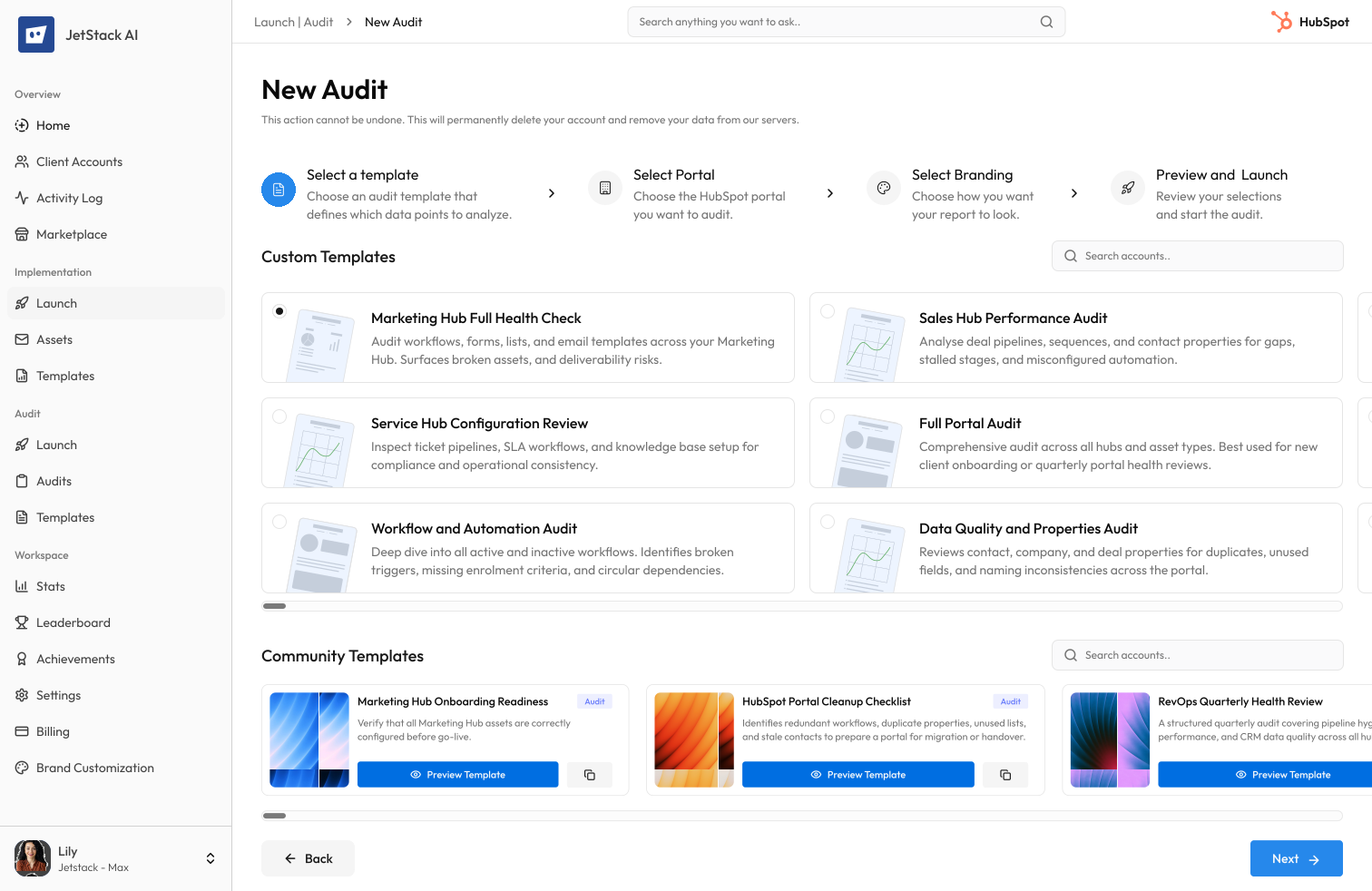
Select a base template
Start from a HubSpot portal audit template — choose by Hub type (Marketing, Sales, Service, CMS) or audit scenario (portal health, migration readiness). Pre-built templates include relevant property groups and workflow sections.
Customize sections
Add HubSpot-specific sections for properties, workflows, sequences, forms, and lists. Set conditional rules so sequence sections only appear when the portal has active sequences, and CTA sections hide for non-Marketing portals.
Add scoring rules
Define HubSpot-specific scoring criteria — property naming conventions, workflow enrollment triggers, list segmentation depth. Preview how scores calculate across portal health categories.
Publish and reuse
Save the template to your HubSpot audit library. Clone it for different Hub tiers, lock critical portal health sections, and share across your team for consistent HubSpot audits.
The difference JetStack AI makes
Before JetStack AI, creating a HubSpot audit template meant copying sections from the last portal audit and spending hours adjusting property lists, removing irrelevant workflow sections, and guessing which Hub features the client used. Sequence sections sat blank, form sections confused Sales Hub clients, and property scoring was a manual spreadsheet exercise. With JetStack AI, templates detect portal configuration automatically, show only relevant sections, and score HubSpot-specific data points without manual setup.
HubSpot audit templates that match every portal — built in minutes, not hours.
Ready to build your first HubSpot audit template?
Get startedFrequently asked questions
Can I import my existing HubSpot audit templates?
Yes. Upload your current HubSpot audit documents and JetStack AI maps sections to HubSpot-specific categories — properties, workflows, sequences, forms, and integrations. Property groups and scoring criteria are preserved.
How does the builder handle different HubSpot Hub tiers?
Templates detect which Hubs are active (Marketing, Sales, Service, CMS, Operations) and their tier level (Starter, Professional, Enterprise). Sections for features unavailable at the client's tier are hidden automatically.
Which HubSpot objects are covered in templates?
All standard objects — contacts, companies, deals, tickets — plus custom objects. Each object type has dedicated property group sections, association mapping, and pipeline configuration checks.
Can I build templates around HubSpot property groups?
Yes. Templates can include sections organized by property group — contact information, deal pipeline properties, custom properties. The builder pulls available property groups from the HubSpot API for accurate coverage.
How do team members share HubSpot audit templates?
Templates are stored in your team library with HubSpot-specific tags (Hub type, portal tier, audit scenario). Any auditor can start from a shared template and customize unlocked sections for their specific engagement.
Less busywork. More delivery, everywhere.
See how JetStack AI turns weeks of manual ops into minutes.
Book a demo now. No commitment, no sales pitch.